Tip Junkie

Now There’s a Tip Junkie App for That!

Holy Smokes Ladies ~  Tip Junkie is now Mobile!!  If you have a smart phone {iPhone, iPad, Andriod} then you’ll have an insiders look to the New Tip Junkie App.  And of course, it’s FREE.

There are several cool features to the New Tip Junkie App but my favorite is that you can “heart” your favorite creative tutorials right on your phone. {squeal}  Yep, that means you’ll be able to bookmark your favorite ideas so you can easily find them again later, even when you’re on the go!

all crafts Now Theres a Tip Junkie App for That!

Tip Junkie iPhone/iPad App – Free!     |     Tip Junkie Andriod App – Free!

all crafts Now Theres a Tip Junkie App for That! all crafts Now Theres a Tip Junkie App for That!

How Do I Use the New Tip Junkie App?

There are so many cool ways to use Tip Junkie on the go with the new Tip Junkie iPhone App:

  • Just think how easy it will be to plan a party. You can “heart” all the tutorials you are going to use for your party and then when you’re at the store – you can bring the tutorial back up on your phone to make sure you’ve purchased all your supplies.
  • When you’re at PTA meeting you can show a picture of what trying to explain to a friend or committee chairperson.
  • When you’re in carpool, you can “heart” all of your favorite tutorials so that you can quickly find them later without having to wait for your browser to load.
  • When you’re at a play date or chatting with a friend you can bond over all the crafty ideas you’re dying to make together.
  • The possibilities are endless!

all crafts Now Theres a Tip Junkie App for That!

What Does It Do?

This is just “phase one” of the Tip Junkie app.  There are many more surprises along with more bells and whistles in the works.  But for now, there are several fun things that the Tip Junkie iPhone app can do {The Android version will differ a bit}:

  • “Heart” your favorite tutorials from ALL of the Tip Junkie sites to “bookmark” them for easy access later
  • Start discussion by leaving comments or questions on the tutorials
  • E-mail any tutorial to yourself or a friend
  • Share any tutorial on Facebook
  • Create a free profile that keeps track of all of your favorite tutorials as well as your activity on the app
  • Participate in the TJ Community

all crafts Now Theres a Tip Junkie App for That!

More Free Features:

  • Home ~  The newest tutorials from ALL of the Tip Junkie sites {heart, comment or view the tutorial}
  • Heart Tip Junkie ~ This is a menu of what’s new on all of the individual Tip Junkie sites
    • TJ Community {forum}
    • Holiday Sites
      • Valentine’s Day, St. Patricks Day, Easter, Mother’s Day, Father’s Day, 4th of July (patriotic), Halloween, Thanksgiving, and Christmas
    • TJ Giveaway Directory {a listing of free stuff up for grabs}
    • Mom Shops {listing of Mom-preneur & Etsy shops}
    • Party site
    • Decorating site
    • Homemade Gifts site
    • Free Printable site
    • Submit a Tip to be featured right from your phone.
  • Facebook ~ See what’s happening over on the Tip Junkie Facebook page.  This is where all of the action is!  You can ask questions, leave your tutorial links from your blog, and really engage with each other.
  • Twitter ~ The latest Tip Junkie tweets and insider tips
  • YouTube ~ Silly videos that I create for your viewing pleasure.  {mostly making fun of my geeky self}

Where Do I Get It?

Wondering how you too can download the new Tip Junkie application for free?  Here you go:

all crafts Now Theres a Tip Junkie App for That!

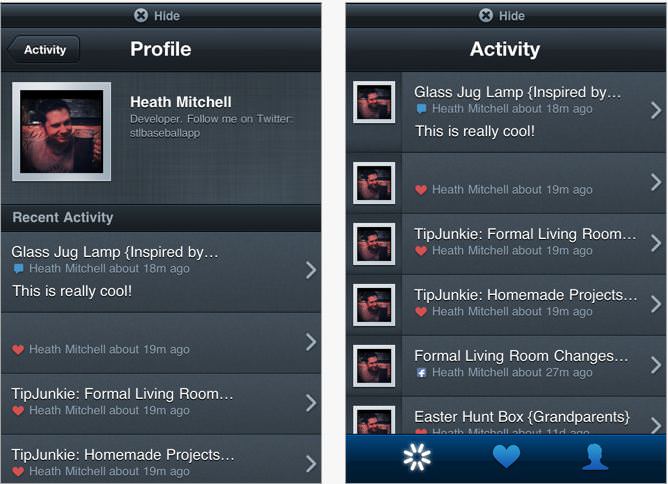
How Do I Make A Profile?

My only complaint with this new fab app is that it doesn’t have a “create a profile” icon.  That seems like a no-briainer to me, but until we get that fixed, it’s really easy to create a free profile.  Here’s how:

  • From any page on the app, take your finger touch the bottom of the screen and “flip up” the page to bring up the “activity” page.  {This may take a few tries}
  • It will take you to a black “activity” page and click on the person icon to upload a photo and edit your screen name.
  • The heart icon is all of your bookmarked tutorials.

all crafts Now Theres a Tip Junkie App for That! all crafts Now Theres a Tip Junkie App for That!

I am really excited about this new way to view and interact with Tip Junkie.  There’s still more to come but in the meantime, I hope this helps make things a little easier for you in your busy, busy life.  {hugs}

all crafts Now Theres a Tip Junkie App for That!


Creating Memories that Endure,

Laurie

Comments


  1. Lauren @ten23designs says: #1

    Congratulations!!! I am going to download it now!

    Reply


  2. crystal says: #2

    I am soooo excited! I just downloaded it! this is awesome!

    Reply


  3. Colleen says: #3

    Any plans for a blackberry version? I love this idea!

    Reply


  4. Jane says: #5

    Just wanted to let you know how amazingly talented you are! Thank you for sharing your heart and all your creative knowlege with us!

    Reply


  5. Mommyof2Girlz/Steph says: #6

    Wow how awesome, congrats! I will definitely get it for my Droid :)
    Mommyof2Girlz/Steph recently posted..Birthday In PennsylvaniaMy ComLuv Profile

    Reply


  6. Becca says: #7

    Congratulations! This is a huge accomplishment and pretty stinkin awesome!

    Reply


  7. Chacoy says: #8

    Yowzers! I love that there is an app for Tip Junkie! I am always browsing and wish I could remember where it was now I don’t have too, my phone will do it for me!!!
    Woo Hoo Congrats Laurie;)
    Chacoy recently posted..Good Things Come In 3s 20 Chilis Gift Card GiveawayMy ComLuv Profile

    Reply


  8. Lynne says: #9

    Wow, can I add this to my phone “review”. All the girls must haves on a phone!

    http://tiilipeninsula.blogspot.com/2011/05/mobile-phone-or-mine-at-least.html

    Reply


  9. Heather says: #10

    Love that you have an app, just sad I can’t download it on my iPhone :(

    Reply


  10. Rebecca says: #11

    I’m so excited! Just Downloaded it!
    Rebecca recently posted..Reposting Kellys Burgers!My ComLuv Profile

    Reply


  11. Sall says: #12

    Just installed! So excited and happy! Thanks!!!!! <3

    Reply


  12. Hillary B. says: #13

    I just got it!! I am so excited!!! It is too awesome!!! :D
    Hillary B. recently posted..Our busy beginning of the year! Bitter Family ReunionMy ComLuv Profile

    Reply


  13. Tricia says: #14

    Very cool! Can’t wait to download it this evening!

    Reply


  14. Pamala Watts says: #15

    android app does not seem fully functional :( there is no way to heart the articles and there is nothing about profiles or anything like how you described for the iphone :( the only thing I can do is browse.. but again there is no saving it for later unless I click share and send it through an email or sms or whatever..

    Reply


  15. Laura says: #17

    I second the blackberry suggestion!

    Reply


  16. Sue Morris says: #18

    congratulations on the new app! how FUN! I’m going to download it for my Android. :)

    Reply


  17. Kelley says: #19

    I was really excited about the app until I discovered with the Droid version, you can’t favorite things, or use the profile feature. So, I may as well surf online.

    Reply


  18. Tricia says: #21

    Hi Laurie; When I downloaded the app all it does it show the cover page and then closes. I don’t know how to get it to work. Do you have any suggestions? Thanks!

    Tricia

    Reply


  19. Kristen says: #23

    Very cool, Laurie! Congrats!

    Reply


  20. Joyce says: #24

    So excited to have the app! Loading it now!

    Reply


  21. charlene says: #25

    I just got the app can’t wait to try it out…thanks
    charlene recently posted..NEW RANDOM SHOTSMy ComLuv Profile

    Reply


  22. Holly Hamann says: #26

    You are amazing – what a fabulous way to let people interact with your content while on the go. Laurie – you are incredible!

    Reply


  23. Megan B says: #27

    I am having the same issue as Tricia, it just shows an opening image, then crashes. I deleted it and tried downloading it again, but same thing. I have an iPhone (not the new version but the new software) if that helps…

    Reply


    • Laurie Turk says: #28

      Thanks Megan – my programmer is working on it. Sadly, it seems to be an issue with the iPhone 3Gs not the software from the app itself. {grrr} We’ve contacted Apple and are trying to resolve it as fast as possible. Thank you so much for letting me know.

      Laurie {Tip Junkie}
      Laurie recently posted..6 Steps to Reduce Water Needed In My GardenMy ComLuv Profile

      Reply


      • Dawn S says: #29

        I’m having the same trouble, too! Can’t wait for it to be resolved as I really enjoyed the app when I was able to use it! Great app!

        Reply


  24. Heather says: #30

    I’m heeled about the app! Going to download it right now

    Reply


    • Heather says: #31

      I’m meant geeked… Stupid auto correct :)

      Reply


  25. Debip says: #32

    I have been with you since the beginning and all I can say is wow you are one amazing woman…keep it up Laurie

    Reply


  26. AussieK says: #33

    Great to hear there is an app for Tip Junkie. I hope you will make this available in the Australian itunes store (would even be willing to pay!)

    Reply


  27. Brandie says: #34

    Love the app :)

    Reply


  28. Amanda says: #35

    I’m sure you’re getting sick of hearing this but I am having the same issue with the app. I have an iTouch and I have deleted and downloaded several time am still having the same problem. Any progess?

    Reply


  29. Peter says: #36

    Wow this is really great and it looks really great to. I really like tipjunkie and now I can see it all the time no matter where I am. Keep on the good work.
    Peter recently posted..kantoormeubelenMy ComLuv Profile

    Reply


  30. Julie says: #37

    This is so awesome! I can’t wait to use it everyday!
    Julie recently posted..Whimsy Halloween WreathMy ComLuv Profile

    Reply


  31. Tam Vo says: #38

    Congratulationsssssssssssssssssssssssssss!!!!!!!!!!!!! That is so AWESOME!

    Reply


  32. caroline @ c.w.frosting says: #39

    Wow, how exciting! Congrats on the app. Must download tonight!
    caroline @ c.w.frosting recently posted..No-Sew RufflekinsMy ComLuv Profile

    Reply


  33. The Spring Mount 6 Pack says: #40

    Love this. I will be sure to download it. I am all about my iphone apps. I would love to know how you made it. A friend and I were talking about this the other day, comparing a few programs. Care to share the link? IN return I will be happy to give a shout out on my site about your app.
    The Spring Mount 6 Pack recently posted..DIY Halloween Costume IdeasMy ComLuv Profile

    Reply


  34. Cathleen Moses says: #41

    Love it!! You are too cool.

    Reply


  35. ashlee says: #42

    totally got it already!!! congrats Laurie!

    Reply


  36. michelle says: #43

    Thank you!!! Can’t wait to upload this app.

    Reply


  37. Cindy says: #44

    I tally love the app! I’ve already installed it on my iPhone, and it is really cool, I can read and search in a very easy way, on the tram or at work during the coffe break:)

    Reply


  38. Shannon says: #45

    Would love a windows phone app!

    Reply


  39. Arlene @ Flour On My Face says: #46

    downloaded and it looks FUN! Can’t wait to play with it.

    Reply


  40. Tom says: #47

    WOZZERSSS

    Reply


(will not be published)

CommentLuv Enabled